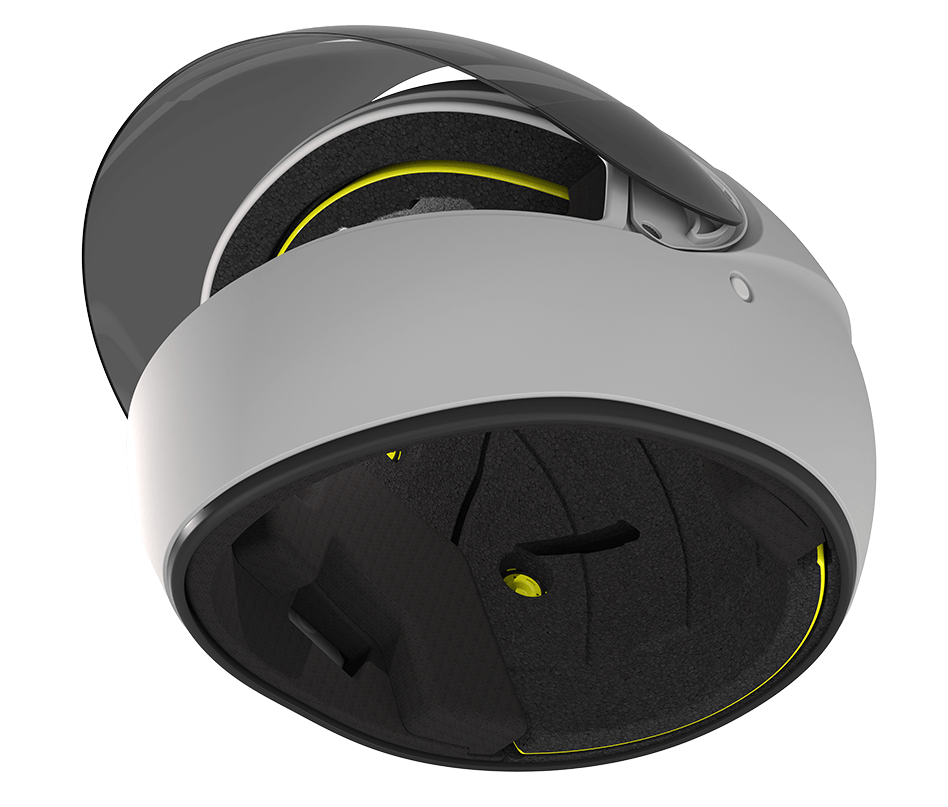

Mips Integra Split

The Mips® Integra Split system is integrated into the energy-absorbing liner. By splitting the liner into three separate parts and adding a low-friction surface between the movable layers, the system can move to help reduce rotational motion to the head in certain angled impacts. Flexible fixations allow for controlled movement of the parts.

On the following pages you will find all you need to know about how we work with product branding and design on Integra Split. For more detailed construction guidelines, we recommend you to contact your Mips engineer.

Checklist for Mips Integra Split

Mips Solution: D2s

  • Color on Low Friction layer (LFL)

  • Woofer fixations

  • Family Graphic

  • Equipped logo

  • On-helmet logo

  • Mips hangtag

  • Box label

  • Family Graphic

    Mandatory
    Minimum size: 27,34×6,5mm
    Type: UVDRT sticker
    2 Versions of sticker: Yellow/white or black

    Placement: Visible in the crown of the helmet. See detailed placement guide below.

    Family Graphic

    Mandatory
    Minimum size: 27,34×6,5mm
    Type: UVDRT sticker
    2 Versions of sticker: Yellow/white or black

    Placement: Visible in the crown of the helmet. See detailed placement guide below.
  • Equipped logo

    Optional
    Textile flag in yellow or black
    Textile patch in yellow
    Printed graphic on comfort liner

    Equipped logo

    Optional
    Textile flag in yellow or black
    Textile patch in yellow
    Printed graphic on comfort liner
  • LFL color

    Black, CMYK 0/0/0/100
    Yellow, CMYK 0/0/100/0
    Option to have customized color

    LFL color

    Black, CMYK 0/0/0/100
    Yellow, CMYK 0/0/100/0
    Option to have customized color
  • Fixations

    Woofer
    Black or yellow option

    Fixations

    Woofer
    Black or yellow option
  • On -helmet logo

    Mandatory
    Minimum size: 16mm
    Freezone: Surrounded by a 60% freezone
    Placement: Lower left, detailed guide for placement below.

    On -helmet logo

    Mandatory
    Minimum size: 16mm
    Freezone: Surrounded by a 60% freezone
    Placement: Lower left, detailed guide for placement below.
  • Boxlabel

    Optional
    Oredered by Mips or printed locally
    Size 220x40mm
    For more detailed information, download below document.

    Download

    Boxlabel

    Optional
    Oredered by Mips or printed locally
    Size 220x40mm
    For more detailed information, download below document.
    Download
  • Mips Integra hangtag

    Mandatory
    Provided by Mips in the bill of material.
    Type: Hangtag for none-removable Mips solutions.
    For more information download below document.

    Download

    Mips Integra hangtag

    Mandatory
    Provided by Mips in the bill of material.
    Type: Hangtag for none-removable Mips solutions.
    For more information download below document.
    Download

Graphics

Our goal with Mips graphics is that we want to take a discreet but clear ownership of our technology with balanced graphic elements without hijacking the overall design of the helmet. Read more below on what type of graphics we work with on Integra Split.

Family Graphic

On Mips Integra Split we use a Family Graphic, highlighting the family and product name. The graphic is pad printed on a cap, that is situated in the crown of the helmet over a woofer fixation. The Integra Split graphic is available in yellow/white.

Textile Flag

We offer the option to use a textile label on the helmet comfort liner if the Mips Low Friction Layer is hidden beneath.

Textile patch

We offer the option to use a textile label on the helmet comfort liner if the Mips Low Friction Layer is hidden beneath.

Printed graphic

In addition to the textile label it´s possible to use a printed graphic on the comfort liner. The printed graphic makes it possible to highlight that the helmet is featured with Mips technology.

On-helmet logo

The Mips logo, nicknamed the Yellow Dot, is our most recognized brand asset. It is placed on the outside of the helmet and brings a feeling of added safety to the user.

Graphics – Orientation

The Mips logo position is key to achieve the best visibility and to keep consistency for the consumer when recognizing a helmet with a Mips safety system. Our goal is to always achieve the same logo placement. However, we understand that in some cases due to different helmet geometries and other design constrains the optimum logo placement is not possible. For these cases we have alternative logo placement guidelines.

ON HELMET LOGO

Looking at the helmet from behind the Mips logo is placed to be visible both from the left and from the rear.